
Shopify vs. WooCommerce: Best for Small Businesses?
Simplicity vs control: choose a hosted, ready-made platform for fast launches or an open-source setup for full customization and long-term control.


When deciding between Shopify and WooCommerce, it boils down to simplicity vs. control. Shopify is ideal for beginners or those who want a quick, hands-off setup. WooCommerce, however, is better suited for businesses needing flexibility and customization but requires more technical effort. Here's a quick breakdown:
- Shopify: A fully hosted platform with predictable costs, fast setup (2–8 hours), and 24/7 support. Plans start at $39/month, but transaction fees apply if you use third-party payment gateways.
- WooCommerce: A free WordPress plugin offering complete customization but requires hosting, maintenance, and technical skills. Costs vary ($5–$100+/month for hosting), but there are no platform transaction fees.
Quick Comparison:
| Feature | Shopify | WooCommerce |
|---|---|---|
| Ease of Use | Beginner-friendly | Requires technical skills |
| Setup Time | 2–8 hours | 20–80 hours |
| Monthly Costs | $39–$399+ | $5–$100+ (hosting) |
| Transaction Fees | 0.5%–2% (3rd-party payments) | None |
| Customization | Limited | Full control |
| Support | 24/7 live support | Community forums, hosting support |
| SEO | Built-in tools | Advanced with plugins |
Key Takeaway: Choose Shopify for a fast, hassle-free start. Opt for WooCommerce if you need advanced customization and are comfortable managing technical aspects. Both platforms have pros and cons, so your choice depends on your priorities and resources.
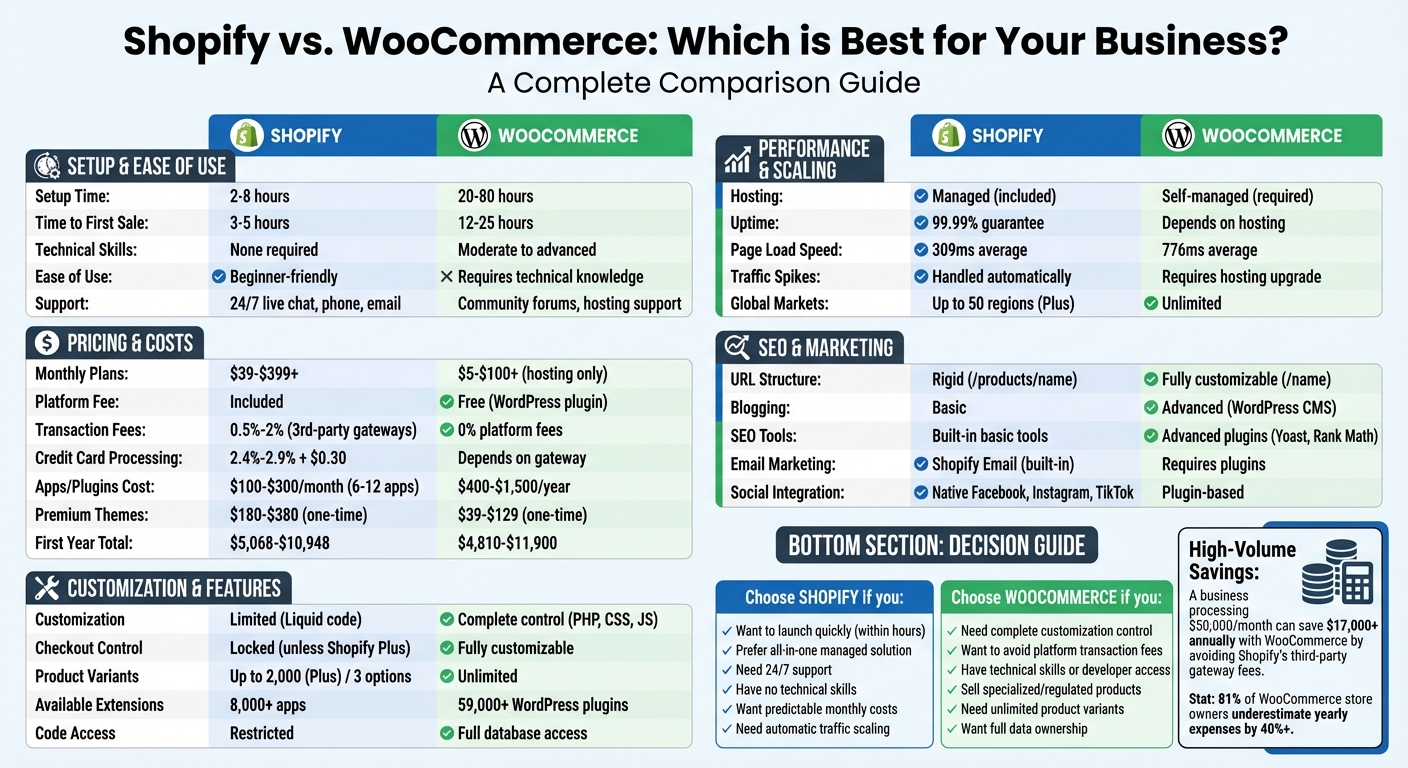
Shopify vs WooCommerce: Complete Comparison for Small Businesses
Pricing and Total Costs
Monthly Fees and Subscription Plans
Shopify keeps things simple with its fixed monthly subscription plans. The Basic plan is $39 per month ($29 if billed annually), the Shopify plan costs $105 per month ($79 annually), and the Advanced plan is $399 per month ($299 annually). These prices include hosting, security, SSL certificates, and regular updates.
WooCommerce, on the other hand, is free to download, but the overall costs add up quickly. You’ll need web hosting ($5–$15 per month for shared hosting or $25–$100+ per month for managed WordPress hosting), a domain name ($10–$20 per year), and possibly an SSL certificate ($0–$100 per year). Interestingly, 81% of WooCommerce store owners underestimate their yearly expenses by at least 40%.
Now, let’s break down how each platform handles transaction fees.
Transaction Fees and Payment Processing
Shopify uses a dual-fee system that can be tricky for new merchants. If you stick with Shopify Payments, you’ll pay standard credit card processing rates: 2.9% + $0.30 on the Basic plan, 2.6% + $0.30 on the Shopify plan, and 2.4% + $0.30 on the Advanced plan. However, if you opt for a third-party payment gateway like PayPal or Stripe, Shopify tacks on an extra fee ranging from 0.5% to 2.0%, depending on your plan.
WooCommerce, by contrast, charges no platform transaction fees, no matter which payment gateway you use. To put this into perspective, a Shopify merchant on the Basic plan processing $1 million annually through a third-party gateway would pay $20,000 in extra platform fees. Meanwhile, a business processing $50,000 monthly could save over $17,000 annually by choosing WooCommerce and avoiding these additional charges.
| Plan | Shopify Payments | 3rd-Party Gateway (Shopify) | WooCommerce (Any Gateway) |
|---|---|---|---|
| Basic | 2.9% + $0.30 | + 2.0% fee | 0% platform fee |
| Shopify | 2.6% + $0.30 | + 1.0% fee | 0% platform fee |
| Advanced | 2.4% + $0.30 | + 0.5% fee | 0% platform fee |
These transaction fees can significantly impact recurring costs, especially for high-revenue stores.
Additional Costs: Themes, Plugins, and Development
The true cost gap between Shopify and WooCommerce becomes clear when you factor in themes, plugins, and maintenance. A typical Shopify store uses 6 to 12 apps, spending $100–$300 monthly. For larger stores, essential apps for marketing, reviews, and returns can push monthly costs to $2,000–$5,000. Premium Shopify themes are a one-time purchase, priced between $180 and $380.
WooCommerce themes are cheaper upfront, ranging from $39 to $129. However, you’ll need to set aside $400–$1,500 annually for essential plugins. Security and backup services add another $150–$400 per year. Maintenance is another consideration - WooCommerce requires manual updates for WordPress core, themes, and plugins. If your time is worth $50 per hour, the 3–15 hours spent on monthly maintenance could cost up to $7,800 annually in opportunity costs.
"The platform fee is the smallest part of your ecommerce costs. Whether you pay $0 or $39/month for your base platform is almost irrelevant when you're spending $500–$2,000/month on everything else." - Tejas Kedare, E-commerce Consultant
For a store making $100,000 in annual revenue, the total first-year costs range from $5,068–$10,948 on Shopify, compared to $4,810–$11,900 on WooCommerce. Once you account for hosting, security, add-ons, and developer time, the overall expenses for both platforms are surprisingly similar.
Setup and Ease of Use
Getting Started: Setup Time and Process
Shopify is built with speed and simplicity in mind. Its guided setup wizard takes you through every step - choosing a theme, adding products, and setting up payment options. Most users can have their store live within 2 to 8 hours and achieve their first sale in as little as 3 to 5 hours. Plus, Shopify bundles everything you need, like hosting, SSL certificates, security, and PCI compliance, all pre-configured for you.
WooCommerce, on the other hand, requires a more hands-on approach. You’ll need to purchase hosting, install WordPress, and then add the WooCommerce plugin. This process typically takes 20 to 80 hours, with first sales happening around 12 to 25 hours after setup. You’re also in charge of setting up security, installing an SSL certificate, and selecting a hosting provider. Managing multiple dashboards is part of the experience with WooCommerce.
"This contrast underscores each platform's inherent tradeoffs."
These differences in setup reflect the platforms’ broader technical demands, which also affect customization.
Technical Requirements and Customization
Shopify caters to non-technical users. Its drag-and-drop editor makes it easy to tweak your store’s look and feel without touching code. However, if you want to dive deeper into customization, you’ll need to learn Liquid, Shopify’s proprietary coding language. One limitation to keep in mind: the checkout process is locked unless you upgrade to Shopify Plus, which restricts how much you can tailor the customer experience.
WooCommerce offers complete control over your store’s code, including PHP, HTML, CSS, and JavaScript. This allows you to customize every detail, from the checkout process to core functionalities. But with great flexibility comes added complexity. You’ll need moderate-to-advanced technical skills - or a developer - to handle plugin conflicts, server optimizations, and manual updates. The WordPress interface can also feel a bit fragmented, requiring you to switch between the block editor and the classic dashboard.
These technical demands naturally influence the kind of support you’ll need, as outlined below.
Customer Support and Documentation
Shopify shines in its support offerings, providing 24/7 live assistance via chat, phone, and email. However, it holds a 1.3/5 rating on Trustpilot, with users often criticizing the quality of support.
WooCommerce takes a decentralized approach. Support depends on the specific provider of your hosting, plugins, or themes. Most users rely on community forums and documentation to troubleshoot issues. WooCommerce has a slightly better 2.0/5 Trustpilot rating, but complaints often focus on plugin conflicts and the steep learning curve. Opting for managed WooCommerce hosting can lighten the load by handling tasks like backups and security updates, though this convenience comes at an extra cost.
Features and Ability to Scale
Built-In Features and Extension Options
Shopify offers an all-in-one solution, bundling hosting, SSL, payment processing, and tools for multi-channel selling. It integrates seamlessly with platforms like Facebook, Instagram, and Amazon. However, adding functionality through apps can increase your monthly costs. Shopify’s App Store includes over 8,000 apps that are carefully reviewed for security and compatibility.
WooCommerce, on the other hand, operates within an open ecosystem. The core plugin is free, and you can enhance your store with over 59,000 WordPress plugins and 900+ verified extensions from its official marketplace. This open structure gives you unmatched flexibility - you can tweak core code, build custom features, or include specialized business logic. That said, this freedom comes with the responsibility of maintaining your plugins to avoid compatibility issues.
"By empowering developers to create truly bespoke online stores, WooCommerce outshines Shopify's closed, more restrictive approach." - Mitchell Callahan, Founder, Saucal
For example, DVO Suspension, a mountain bike component company, uses WooCommerce to power a sophisticated product configurator that allows customers to customize frames, wheels, and handlebars in real time. In contrast, Kylie Cosmetics relies on Shopify Plus during high-demand product launches, managing hundreds of thousands of visitors and processing thousands of orders per minute without downtime.
Next, let’s dive into how these platforms handle performance under heavy traffic.
Site Performance and Traffic Capacity
Shopify is built to handle traffic surges effortlessly. It uses a global Content Delivery Network (CDN) powered by Fastly and offers a 99.99% uptime guarantee on Shopify Plus. A third-party study reported Shopify’s average page load time at 309 milliseconds, significantly faster than WooCommerce’s average of 776 milliseconds.
WooCommerce’s performance depends heavily on your hosting provider and technical setup. To manage high traffic, you may need to implement object caching, a CDN, and database optimizations. Managed hosting providers like Kinsta or WP Engine simplify these tasks but can cost between $500 and $2,000 per month for enterprise-level hosting.
Now, let’s see how each platform scales to meet the demands of growing businesses.
Growth Potential and Enterprise Capabilities
Shopify does have some restrictions. For instance, it allows up to three options per product variant and, on Shopify Plus, a maximum of 2,000 variants per product. Additionally, its international market support is capped at 50 regions on the Plus plan. For businesses generating monthly sales over $800,000, Shopify charges a 0.25% revenue share.
WooCommerce, in contrast, supports unlimited products, variants, and markets. With access to your full database, you can scale and customize backend processes as needed. Andrew Aversa, President of Impact Soundworks, shared that WooCommerce enables them to implement tailored business logic for their specialized software products - something many platforms can’t handle out of the box. Plus, businesses processing over $500,000 annually could save over $17,000 in transaction fees compared to Shopify, which charges extra for third-party payment gateways.
| Scalability Factor | Shopify | WooCommerce |
|---|---|---|
| Traffic Spikes | Managed automatically | Managed via hosting tier |
| Product Variants | Up to 2,000 (Plus) / 3 options | Unlimited |
| Global Markets | Capped at 50 regions (Plus) | Unlimited |
| Transaction Fees | 0.5%–2% (if not using Shopify Payments) | 0% platform fees |
| Data Ownership | Closed ecosystem | Full database access |
SEO and Marketing Capabilities
SEO Features and Control
Shopify simplifies many SEO tasks by automating processes like generating XML sitemaps and including free SSL certificates across all plans. Its global CDN ensures faster page load times, and you can directly edit meta titles and descriptions through the dashboard - no plugins required. However, Shopify enforces a set URL structure, such as /products/ for product pages and /collections/ for collection pages, which restricts your ability to optimize URLs with specific keywords.
On the other hand, WooCommerce doesn't come with built-in SEO tools, but its integration with WordPress opens the door to powerful plugins like Yoast SEO and Rank Math. These tools give you complete control over SEO elements, including fully customizable permalinks. For instance, you can create URLs like /shoe-name instead of Shopify's rigid /products/shoe-name. The Good Chocolate, an organic chocolate brand, leveraged WooCommerce and Yoast SEO to implement advanced schema markup and custom meta settings, significantly boosting their rankings in niche organic searches.
"WooCommerce offers superior URL customization, crucial for keyword optimization." - XHTMLTEAM
Shopify also scores points for its automatic handling of Core Web Vitals, mobile optimization, and canonical tags, which helped Allbirds improve their keyword rankings. In contrast, WooCommerce users must manually manage hosting, caching, and image optimization to achieve similar results.
| Feature | Shopify | WooCommerce |
|---|---|---|
| URL Structure | Rigid (e.g., /products/shoe-name) |
Fully Customizable (e.g., /shoe-name) |
| Sitemaps | Automated | Requires Plugin (e.g., Yoast) |
| Meta Tag Control | Built-in basic editing | Granular (via Yoast/Rank Math) |
| Technical SEO | Managed by platform | Full user control |
| Ease of Use | High (Beginner-friendly) | Moderate (Steeper learning curve) |
Both platforms have their strengths, but their differences become even clearer when looking at their content publishing capabilities.
Blogging and Content Publishing
WooCommerce, built on WordPress, offers a robust content management system ideal for businesses that rely heavily on content marketing. It supports advanced content strategies like pillar pages, content clusters, and detailed category structures. Features like content scheduling, tagging, and categorization provide the flexibility needed for creating and managing complex content architectures.
"If your SEO strategy leans on content clusters, pillar pages, or topical authority, WooCommerce wins hands down." - BTmarketing
Shopify, by comparison, comes with a basic blogging tool. While it allows you to publish posts and add images, it lacks the depth and flexibility of WordPress. For businesses focused on producing educational guides, tutorials, or long-form content to rank for competitive keywords, WooCommerce stands out as the better option.
After addressing SEO and content, let’s explore how these platforms handle email marketing and social media integration.
Email Marketing and Social Media Integration
Shopify provides Shopify Email, along with seamless catalog syncing for platforms like Facebook, Instagram, TikTok, and Pinterest. This makes launching campaigns quick and straightforward. Additionally, Shopify uses AI to assist with writing marketing copy and designing creative assets. For example, in October 2024, MVMT utilized Shopify’s integrated marketing tools to achieve a 50% increase in sales and boost customer satisfaction.
WooCommerce, however, requires users to build their own marketing stack. Plugins like MailPoet or Klaviyo handle email campaigns, while official plugins sync product catalogs with Facebook and Instagram. While this setup demands more effort, it allows for detailed customer data analysis and advanced targeting options. In October 2024, Organized Themes used WooCommerce’s flexibility to customize their store experience, achieving a 50% increase in sales.
"Shopify wants to be your marketing manager while WooCommerce hands you the toolbox and says good luck." - Slaterock Automation
Ultimately, the choice between Shopify and WooCommerce depends on your priorities - whether you prefer a ready-to-use marketing solution or the freedom to tailor your strategies.
Shopify vs WooCommerce ✅ Full Comparison: Features, Costs & Verdict (2026)
Which Platform Fits Your Business?
Let’s break down how Shopify and WooCommerce align with different business needs, based on the technical and cost comparisons we’ve already covered.
For Fast Launches and Non-Technical Users
If you’re a non-technical founder looking to get up and running quickly, Shopify is your go-to option. It takes care of hosting, security, SSL certificates, and software updates automatically, so you can focus on running your store without worrying about the backend. Plus, Shopify's 24/7 support is a lifesaver, especially compared to WooCommerce's reliance on hosting providers and community forums for troubleshooting.
"Shopify is the right choice when you want to focus entirely on running your store without thinking about servers, security, or technical infrastructure." – Codeable
Shopify’s managed ecosystem makes it simple: you get predictable costs, fast launches, and no headaches over hosting or maintenance.
For Custom Requirements and Specialized Businesses
On the flip side, WooCommerce shines when your business has unique needs. Whether it’s complex pricing models, custom checkout processes, or highly specialized product configurations, WooCommerce’s open-source framework gives you complete freedom to tailor your store. With access to PHP and MySQL, you can build features that standard e-commerce platforms just can’t handle.
Shopify, by contrast, limits advanced customizations and B2B features to its high-end "Plus" tier, which starts at around $2,300 per month. WooCommerce is also a favorite for businesses selling regulated products like CBD or supplements, as it avoids the risk of account suspensions often associated with SaaS platforms.
"WooCommerce is the right choice when you need complete control over the customer journey, want to own your data and code, and value flexibility over managed convenience." – Codeable Blog
However, all that flexibility comes with added responsibilities. You’ll be in charge of managing hosting, backups, security, and ongoing maintenance. While WooCommerce offers unmatched control, you’ll need to consider whether you have the resources to handle these tasks as your business grows.
Switching Platforms as You Grow
Switching platforms down the road isn’t just inconvenient - it can be expensive and time-consuming. Migration costs can easily climb into the tens of thousands of dollars in developer fees and take months to complete. Shopify’s closed SaaS system makes exporting data a challenge, while WooCommerce’s open-source design allows full data portability and database access.
"Choosing between them is one of the highest-stakes technical decisions an eCommerce business makes - the wrong choice costs months of migration work and tens of thousands in developer fees to reverse." – Digital Applied
If rapid growth is in your plans, think long term. Shopify Plus offers a 99.99% uptime SLA and can handle traffic surges automatically, which is ideal for businesses anticipating viral product launches or flash sales. On the other hand, scaling WooCommerce requires manual effort - you’ll need to upgrade your hosting plan and optimize your database as traffic increases.
When migrating, it’s critical to minimize disruption. Start with a pilot migration for 10% of your traffic, maintain your URL structures to protect SEO, and set up a one-to-one redirect map before fully switching over.
Conclusion
Shopify offers a straightforward, ready-to-use solution, while WooCommerce provides flexibility through its open-source nature. Shopify takes care of hosting, security, and maintenance for you, so you can focus on selling. On the other hand, WooCommerce, as a WordPress plugin, gives you complete control over your store’s design and functionality, but it does require you to manage the technical side of things.
Here’s a quick recap of the key differences: Shopify simplifies operations, making it ideal for those who prefer a hassle-free setup. WooCommerce, however, allows for more tailored development. If you’re a non-technical user looking to get your store up and running quickly - often within 30 to 60 minutes - Shopify’s Basic plan at $39/month provides an all-in-one solution with 24/7 support. But if you need custom features, like specialized product configurations or checkout processes, and want to avoid platform transaction fees as your business grows, WooCommerce offers the flexibility you’ll need. Keep in mind, though, that this comes with additional costs for hosting and maintenance.
Both platforms are used by millions of businesses worldwide and cater to a wide range of industries and scales. Shopify is designed to handle sudden traffic spikes effortlessly, with 99.98% uptime guaranteed. WooCommerce, while offering unlimited customization, requires you to actively manage your infrastructure.
Ultimately, your choice should align with your technical expertise, budget, and long-term goals. Think about whether you’d rather spend your time creating marketing campaigns or configuring servers. This comparison underscores how each platform caters to different e-commerce needs, helping you decide which tool aligns best with your business strategy.
For more detailed comparisons and expert advice, check out StackRundown.
FAQs
Which platform is cheaper long term for my store?
WooCommerce might appear less expensive at first glance since it’s a free plugin. However, additional expenses like hosting, themes, and plugins can quickly add up, ranging from $100 to $500+ per year. On the other hand, Shopify starts at $29 per month, which includes hosting, security, and maintenance. This all-in-one pricing model provides consistent, predictable costs. While WooCommerce may save you money initially, Shopify’s bundled approach often proves more manageable and budget-friendly in the long run - especially for businesses aiming to scale smoothly.
What ongoing maintenance is needed for WooCommerce?
Maintaining a WooCommerce store requires consistent attention to keep everything secure and functioning properly. Start by ensuring WordPress, plugins, and themes are always up to date - this helps avoid compatibility issues and vulnerabilities. Regular backups are a must, so you can restore your store if something goes wrong.
It's also wise to scan for malware routinely, check for broken links that could frustrate customers, and monitor your site's performance to catch any slowdowns. On the operational side, keep your inventory updated, test your checkout process regularly to ensure it's working as expected, and put security measures in place. Tools like uptime monitoring and vulnerability scans can help protect your store and keep it running smoothly.
Will switching platforms later hurt my SEO?
Switching platforms can influence your SEO, but the extent of the impact largely hinges on how the migration process is managed. To minimize disruptions, it's essential to handle key elements like data mapping, URL redirects, and metadata updates with precision. While you might notice some short-term ranking fluctuations, a well-planned and carefully executed migration can help maintain your search rankings and limit any lasting effects.